Can a Mac play audio on two Bluetooth headphones or speakers at the same time?
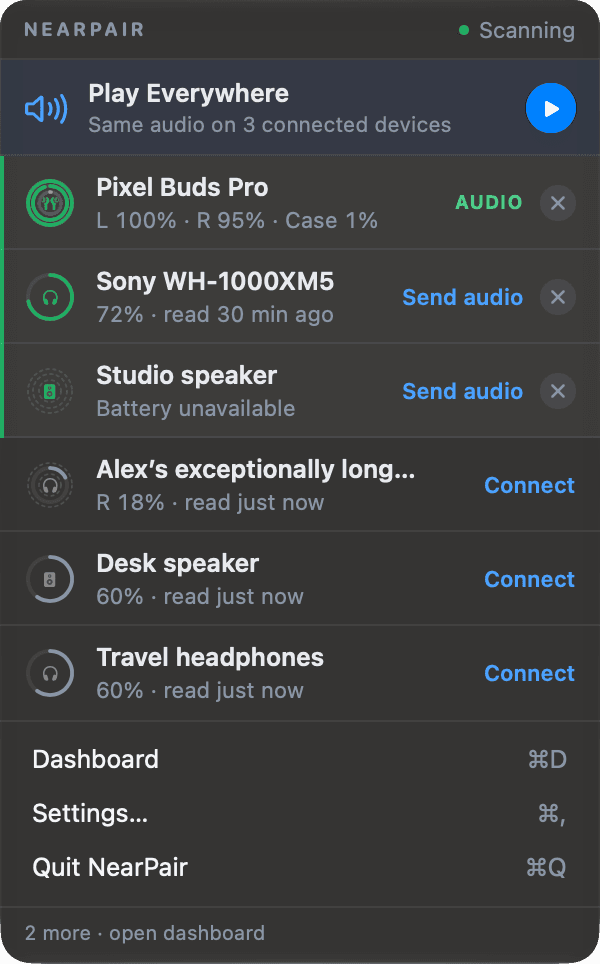
Yes. macOS can combine outputs into a Multi-Output Device in Audio MIDI Setup, then send sound to all of them. NearPair’s Play Everywhere does the same from the menu bar: pick two or more connected outputs and start.
Why it is not a simple switch
The Sound settings let you choose one output at a time. Sending audio to several needs an aggregate device that feeds each output with the same stream, and macOS only exposes that in a professional audio utility.
Set it up by hand
- Connect every pair of headphones or speaker you want to use.
- Open Audio MIDI Setup (in Applications → Utilities).
- Click + at the bottom left and choose Create Multi-Output Device.
- Tick each output, and enable Drift Correction for every device except the top one.
- Choose the new Multi-Output Device in System Settings → Sound → Output.
The system volume keys do not control a Multi-Output Device, and you need to return to the Sound settings to stop.
Or do it from the menu bar
Play Everywhere lists the outputs that are connected right now: earbuds, speakers, headsets, displays and the Mac’s own speakers. Tick two or more and the same audio goes to all of them. Stop it from the same place, and your previous output comes back.
- Any two or more connected outputs
- Started and stopped from the menu
- The built-in speakers count too
macOS 14 or later, Apple silicon. No account, no payment details for the trial.
Questions
Will the two outputs be in sync?
Close, but not always perfectly. Different Bluetooth accessories buffer audio differently, so there can be a small delay between them. For two people listening on separate headphones it is rarely noticeable.
Can I share audio between AirPods and non-Apple earbuds?
Yes. Play Everywhere works with any outputs macOS can play to, whatever the brand.