Skip to content
−45 dBmThe case just opened

Your earbuds are here.
Let your Mac say hello.

Open your earbuds beside your Mac. NearPair welcomes compatible accessories with a little card showing their real name, the battery levels they share, and one button to connect. A familiar moment, now on your Mac.

Download for Mac FREE FOR 14 DAYSBuy once $19
NO CARD, NO ACCOUNTPAY ONCEEVERY MAC YOU OWNDEVICE DATA STAYS ON YOUR MAC
THE CARDHALF A SECOND LATER
NEARPAIR
FAST PAIR · 0xFE2C
Redmi Buds 5

Very close · case is charging

LEFT85%
RIGHT95%
CASE37%
Set Up on This Mac
−50 dBmSee it for yourself

Take a little look. It only takes 18 seconds.

Here is what happens when you open a case beside your Mac. This is a real recording, at its original speed, from start to finish.

WHAT YOU SEE

A pair of Redmi Buds 5, out of the box

WHAT HAPPENS

Your earbuds appear by name. Connect them, then take a look at their battery in the dashboard

SCREEN CAPTUREREAL TIME
−60 dBmYour battery, at a glance

Three batteries. Three arcs. One glance.

The outer ring is the left earbud, the middle one the right, the inner one the case. Once you know the rings, you can spot your battery levels in the menu bar, on the card, and in the dashboard.

IN MENU

See your accessory’s charge beside the menu-bar icon. When it leaves, you can still find its last reading and how old it is

WARNING

Get a gentle heads-up when your earbuds reach the level you choose, just once each time they run low

HISTORY

Look back over a month of charge history and spot when one earbud keeps running down faster than the other

r52 · LEFT · 85%r41 · RIGHT · 95%r30 · CASE · 37%
THE BANNERAS THEY RECONNECT
Redmi Buds 5

Last reported L 85% · R 90% · Case 72% (12 min ago)

−65 dBmEvery morning after that

They come back. Your Mac says so.

Meeting a new accessory happens once or twice a year. Putting your earbuds back in happens every day. When something you already own reconnects, a small banner slides down to tell you it is back and what it last reported — then leaves on its own.

WHENEVER

It appears however they reconnect — from the case, from Bluetooth Settings, or on their own

WHAT IT SAYS

Their real name and the levels they last shared, with how long ago that reading came in

THEN GONE

No buttons and nothing to dismiss. It never takes focus from what you were doing, and it fades by itself

Inside the app

A little tour of your new companion.

1 / 4Dashboard

01 / 04 · The dashboard

Every accessory you own, finally in one place.

Open it from the menu and there they all are — connected, nearby, or just remembered. Pick one to see what it's reporting, what changed today, and how its charge has moved over the past month.

  • Charge for each earbud and the case
  • A month of history, kept on your Mac
  • Connect, disconnect or send audio, right here
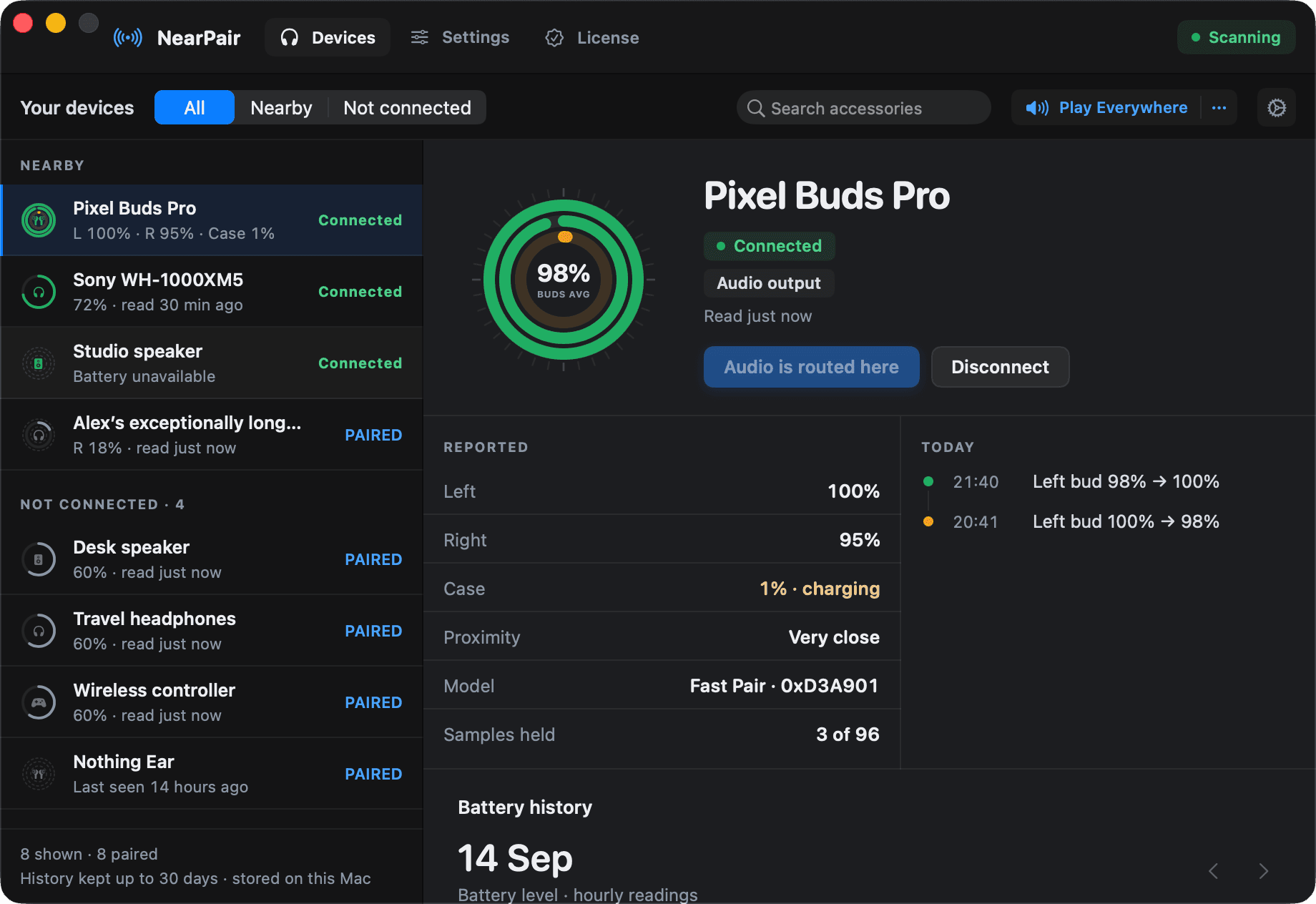
Every accessory you own, finally in one place.
Four little ways to feel at home. Swipe to explore.
−70 dBmA few more little things

This small app can surprise you

Here are 9 little ways NearPair can make your day easier. They are all ready for you to try.

01

Your everyday accessories, recognised

Take a closer look

Your earbuds, headphones, speakers, watches, and controllers are welcome here, including AirPods. NearPair listens for nearby accessories while filtering out laptops, phones, and printers.

02

It knows what they're called

Take a closer look

Your accessories deserve a proper introduction. NearPair looks for their real product name in five different ways, so you can recognise what is nearby.

03

One button does the whole job

Take a closer look

Meeting a new accessory or welcoming one back? The same button pairs or reconnects it for you. Just put your accessory in pairing mode to get started.

04

It reconnects on its own

Take a closer look

Turn on automatic reconnection for your earbuds, and opening the case brings them back without a click. NearPair gives you space after you disconnect them yourself and pauses if a connection fails.

05

Sound follows your headphones

Take a closer look

Choose an accessory for automatic audio switching, and your Mac sends sound to it when it connects. One less thing to remember before you press play.

06

Share what you are listening to

Take a closer look

Send the same audio to two or more connected speakers, headsets or displays at once.

07

Everything you own, in one window

Take a closer look

Every accessory NearPair remembers, what it last reported, and how its charge has moved over the past month. It even flags an earbud that keeps draining faster than its twin.

08

Gives you a little space

Take a closer look

NearPair stays quiet on your lock screen and skips cards for accessories already connected. Choose how close an accessory needs to be, how long its card stays, and which ones to ignore.

09

Works the way you do

Take a closer look

Use VoiceOver, navigate with your keyboard, and keep your preferred Reduce Motion, Reduce Transparency, and Increase Contrast settings. NearPair follows your lead.

Familiar faces, right on your Mac
  • Earbuds
  • Headphones
  • Speakers
  • Watches
  • Controllers
  • Styluses

Supported accessories get a matching icon, so you can recognise yours on the card, in the menu, and in the dashboard.

Meet your accessories

What do you have nearby?

A quick guide to what you can expect. The free trial is the best way to get to know your own setup.

A familiar hello for your listening companions.

NearPair can discover compatible Fast Pair earbuds, AirPods, and headphones in pairing mode. Accessories already paired with your Mac can appear too.

About the battery

Some share separate levels for each earbud and the case. Others share one level, or none at all.

Try it with yours

Compatibility varies by model and macOS version. This guide does not guarantee support for a particular device.

In the wild

104 accessories it knows by name.

Sony WH-1000XM6SonySony WH-1000XM4SonySony WF-1000XM5SonySony WF-1000XM3SonySony WH-CH720NSonySony LinkBudsSonyBose QuietComfort Ultra EarbudsBoseBose QuietComfort Earbuds IIBoseBose QuietComfort 45BoseBose SoundLink FlexBoseBose SoundLinkBoseGalaxy Buds3 ProSamsungGalaxy Buds2 ProSamsungGalaxy Buds ProSamsungGalaxy Buds FESamsungGalaxy BudsSamsungBeats Studio ProBeatsBeats Fit ProBeatsPowerbeats ProBeatsBeats Solo ProBeatsBeats PillBeatsAirPods Pro 2AppleAirPods MaxAppleAirPods 3AppleAirPodsAppleJBL ChargeJBLJBL GoJBLJBL LiveJBLNothing Ear (a)NothingNothing Ear (1)NothingCMF Buds ProNothingPixel Buds Pro 2GooglePixel Buds A-SeriesGooglePixel WatchGoogleOnePlus Buds Pro 2OnePlusOnePlus Buds 3OnePlusSoundcore LibertySoundcoreSoundcore LifeSoundcoreJabra EliteJabraSennheiser MomentumSennheiserRedmi BudsXiaomiboAt AirdopesboAtMarshallMarshallOPPO EncoOPPOSkullcandySkullcandyCMF Headphone ProNothingRedmi Buds 5AXiaomiOnePlus Buds 4OnePlusOnePlus Nord Buds 3ROnePlusrealme Buds AIR8realmerealme Buds T310realmerealme Buds Wireless 3realme
Sony WH-1000XM5SonySony WH-1000XM3SonySony WF-1000XM4SonySony WF-C700NSonySony LinkBuds SSonySony SRS-XBSonyBose QuietComfort Ultra HeadphonesBoseBose QuietComfort EarbudsBoseBose QuietComfort 35BoseBose SoundLink RevolveBoseBose Sport EarbudsBoseGalaxy Buds3SamsungGalaxy Buds2SamsungGalaxy Buds LiveSamsungGalaxy Buds+SamsungGalaxy WatchSamsungBeats Studio Buds+BeatsPowerbeats Pro 2BeatsBeats Solo 4BeatsBeats FlexBeatsAirPods Pro 3AppleAirPods ProAppleAirPods 4AppleAirPods 2AppleJBL FlipJBLJBL XtremeJBLJBL TuneJBLJBL WaveJBLNothing Ear (2)NothingNothing EarNothingCMF BudsNothingPixel Buds ProGooglePixel BudsGoogleOnePlus Buds Pro 3OnePlusOnePlus Buds ProOnePlusOnePlus Nord BudsOnePlusSoundcore SpaceSoundcoreSoundcoreSoundcoreJabra TalkJabraSennheiser AccentumSennheiserXiaomi BudsXiaomiHuawei FreeBudsHuaweiNoise BudsNoiserealme BudsrealmeRedmi Buds 5XiaomiBuds MiniRedmi Buds 5CXiaomiOnePlus Nord Buds 3OnePlusOnePlus Nord Buds 3 ProOnePlusrealme Buds Air 3realmerealme Buds T500 Prorealmerealme Buds Wireless 3 Neorealme
−90 dBmA little clarity

No battery reading? We’ll let you know.

Some accessories do not share their battery level. When yours does not, NearPair shows a dashed ring and “no battery level.” That way, you always know which readings you can rely on.

No battery level available
What stays on your Mac
  • Scanning, name resolution, battery reads
  • Charge history, on disk
  • Accessory names and identifiers — never sent
  • App analytics: anonymous, and switchable off
What you keep after your trial
  • Finding accessories nearby
  • Naming them properly
  • The battery they report
  • Your charge history

Activate with a license key to keep using setup cards, connecting from NearPair, automatic actions.

ORDEROne-time

$19, once, it’s yours.

Make yourself at home with a free fourteen-day trial. No payment details needed. If NearPair feels right for you, one purchase through Polar covers every Mac you personally use, with future updates included.

INCLUDED

Future updates and direct support from the person building it

DELIVERY

Polar sends you your receipt, license key, and download

AFTER TRIAL

NearPair stops until you activate. Your saved accessories, battery history and preferences stay on your Mac, and activating picks up exactly where you left off

Early access license
$19
USD · taxes at checkout

Your trial starts when you first open NearPair, so you can download it now and settle in whenever you are ready. No payment details needed.

LET’S GET YOU SET UP
  1. 01

    Open NearPair.dmg from Downloads.

  2. 02

    Drag NearPair into Applications.

  3. 03

    Open NearPair. You’ll find it in your menu bar, ready for your 14-day trial.

NearPair will let you know when an update is ready. Updates are signed and verified, and you choose when to install them.

VERSION
2.3.0
ARCHITECTURE
Apple silicon
REQUIRES
macOS 14 or later
SIGNING
Developer ID · notarized
AUTOMATED CHECKS
310 passing
PAYMENT TO TRY
None
A little help

A few things you might be wondering.

Will it work with my earbuds?

There is a good chance. NearPair finds compatible earbuds announcing themselves nearby, AirPods, and accessories your Mac has already paired. Battery levels are available when your accessory shares them. The free trial gives you time to see how yours gets along.

Is this made by Apple or Google?

NearPair is an independent Mac app built by one person. It uses the public Bluetooth signals your accessories already share and Apple’s Bluetooth frameworks. You do not need an account to get started.

Can it really pair something new?

Yes. Put your compatible accessory in pairing mode, then use the button on its card to pair and connect. If it needs a little extra help, NearPair opens Bluetooth Settings so you can finish there.

What happens when the trial ends?

NearPair stops working until you activate a license. Scanning stops, and so does everything that depends on it — names, battery levels, the menu-bar dial, notifications, connecting and audio switching. Nothing is deleted: your saved accessories, your 30 days of battery history and your preferences stay on your Mac, and activating picks up exactly where you left off.

Does it send my data anywhere?

Your accessory names, battery readings, and history stay on your Mac. Optional anonymous usage stats help improve NearPair, and you can turn them off in Preferences. Polar handles purchases and license validation; your license key is sent to Polar for validation, never included in analytics.

What do I need to run it?

A Mac running macOS 14 or later with Apple silicon. It asks for Bluetooth permission the first time you open it, and for notification permission only if you want battery warnings.

A small app, made with care

For the little moments at your desk.

NearPair is built by one independent developer, with a simple aim: to make your Mac feel a little more at home with your accessories. A familiar name, an easier connection, one less trip to Settings.

Found something that could feel better? There is a person on the other end, and your feedback is welcome.

Say hello to the maker

Open the case.
Let your Mac say hello.

Try everything for 14 days, with no payment details needed. If you like having NearPair around, it is $19 once, for every Mac you own.

MACOS 14+APPLE SILICONSIGNED & NOTARIZEDDEVICE DATA STAYS ON YOUR MAC